Introduction
Picture this: a member calls their health insurance provider to check a claim status. Within 45 seconds, they've been identified, authenticated, and connected to the right specialist — no hold music, no wrong-department transfers. A well-configured IVR made that possible.
The alternative looks like this: six nested menu levels, confusing jargon, no clear path to a live agent, a caller who hangs up frustrated and calls back three times. That version costs businesses customers — and it's more common than it should be.
IVR (Interactive Voice Response) is one of the most consequential tools in a contact center's technology stack. Designed well, it reduces costs, improves routing accuracy, and keeps service available around the clock. Designed poorly, it actively drives customers away — often before they ever reach an agent.
This guide covers everything you need to know: what IVR is, how it works, its real benefits and limitations, best practices for implementation, and where the technology is heading.
Key Takeaways:
- IVR automates call routing and self-service without requiring a live agent for every interaction
- One financial institution handled 10M+ IVR requests annually through IVR, saving roughly $100M per year (McKinsey)
- Menu redesign alone improved containment by 2–5% and satisfaction by 10–25%
- Evaluate HIPAA and PCI DSS compliance requirements before selecting any IVR system
- Modern IVR is evolving toward AI-powered conversational interfaces — not being replaced by them
What Is IVR in a Call Center?
Interactive Voice Response is an automated phone system that lets callers interact with a company's systems through voice commands or keypad inputs. The system gathers their input, processes it, and routes them to the right department, agent, or self-service path — without a live operator handling each handoff.
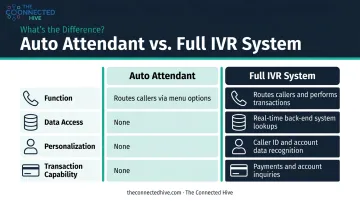
IVR vs. Auto Attendant: An Important Distinction
These two terms are often used interchangeably, but they serve different functions:
| Auto Attendant | Full IVR System | |
|---|---|---|
| Function | Routes calls via menu selection | Routes calls and performs transactions |
| Data Access | None | Real-time back-end system lookups |
| Personalization | None | Caller ID, account data, authentication |
| Transaction Capability | None | Payments, benefit checks, account inquiries |
An auto attendant acts as a virtual receptionist — it plays a menu, accepts a keypad selection, and transfers the call. An IVR system goes further: it can authenticate callers, process payments, and pull live data from back-end systems. The key difference is whether the system can act on information, not just route based on it.
Why This Matters in Practice
Consider a health plan member calling to verify their prescription benefits. A well-integrated IVR system can:
- Identify the caller via their phone number or member ID
- Authenticate their identity using a PIN or date of birth
- Pull their benefits data from the plan's back-end database in real time
- Route them to the appropriate specialist — with that context already loaded
All of this happens before any agent picks up. For healthcare and insurance organizations handling thousands of calls daily, this pre-work is the difference between manageable call volumes and overwhelmed queues.
How Does IVR Work?
IVR combines telephony infrastructure — traditional phone networks or VoIP — with an application server that houses the routing logic, database connections, and input processing. When a caller presses "2," the system receives a DTMF (dual-tone multi-frequency) signal, a standardized audio tone specified in RFC 4733, and acts on it immediately.
Three Interaction Models
| Model | How It Works | Best For |
|---|---|---|
| Touch-tone (DTMF) | Caller presses numbers to navigate menus | Structured inputs: account numbers, PINs, menu selection |
| Directed dialogue | System asks a specific question; caller responds verbally from a defined set | Simple verbal routing: "Say billing or technical support" |
| Natural language (NLP) | Caller speaks freely; system interprets intent | Complex or varied requests: "I need to check my prescription status" |
DTMF remains the standard for noisy environments and numeric input. NLP handles open-ended requests that don't fit a rigid menu. High-volume contact centers — healthcare enrollment lines, financial services IVRs — routinely layer all three models across different call types rather than committing to one.
How Back-End Integration Changes Everything
The model a system uses determines what data it needs — and that's where back-end integration becomes critical. An IVR without database connectivity is just a fancy menu tree. Connected to a CRM, billing platform, or EHR, it becomes a transactional engine.
Cisco's IP IVR documentation confirms that IVR applications can query databases including Microsoft SQL Server, Oracle, Sybase, and IBM DB2 in real time — enabling balance lookups, eligibility verification, and payment processing within the automated flow.
The Role of CTI
Computer Telephony Integration (CTI) is the bridge between the phone network and business software systems. When a caller completes the IVR flow, CTI ensures the agent receives a screen pop with the caller's record already loaded — no "can you repeat your account number?" required. That context handoff is what separates a smooth experience from a disjointed one.
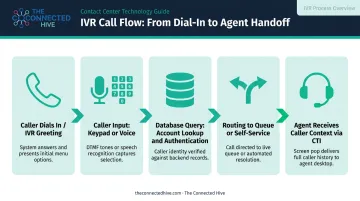
A typical call flow looks like this:
- Caller dials in → IVR greets and presents menu options
- Caller inputs response (keypad or voice)
- System queries database if needed (account lookup, authentication)
- Call routes to the right queue or self-service path
- Agent receives caller context via CTI before answering
Key Benefits of IVR for Call Centers
Cost Reduction at Scale
The most direct financial case for IVR comes from a McKinsey analysis of a North American financial institution: more than 10 million IVR requests handled annually, representing 50% of total call volume, with approximately $100 million in annual savings. That same institution's IVR redesign — focused on journey testing and menu analytics — improved containment rates by 2–5% and satisfaction scores by 10–25% for the affected call types.
The mechanism is straightforward: every routine inquiry resolved in self-service (balance check, appointment confirmation, status update) avoids the cost of agent handling entirely.
Improved First Contact Resolution
IVR lifts FCR by ensuring calls reach agents already pre-sorted. When a caller has authenticated, stated their intent, and landed with a specialist rather than a generalist, the agent resolves the issue on the first interaction. The result: fewer repeat calls and fewer internal transfers.
24/7 Availability Without Added Headcount
IVR doesn't take vacations or sick days. For businesses with predictable volume spikes — health plan open enrollment, tax season for financial services, disaster response for government agencies — IVR absorbs surge volume without requiring emergency staffing. Capacity adjusts to demand without adding a single seat.
Data Collection and Operational Insight
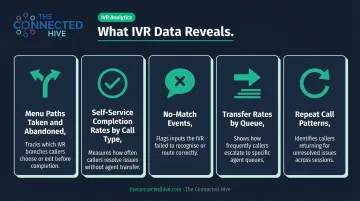
Every IVR interaction generates measurable data:
- Menu paths taken and abandoned
- Self-service completion rates by call type
- No-match events (where speech recognition fails)
- Transfer rates by queue
- Repeat call patterns
These metrics identify friction points faster than any manual audit. When a particular menu node shows abnormal abandonment, that's a clear signal worth investigating.
Consistency in Regulated Industries
In healthcare and financial services, inconsistent information is a compliance risk, not just a customer experience problem. IVR ensures every caller receives the same professionally scripted greeting, the same authentication steps, and the same routing logic — regardless of call volume or time of day.
IVR Challenges — and How to Overcome Them
Poor Menu Design
Long, nested menus are the single biggest source of IVR frustration. When callers face six options at the top level, each branching into three more, they lose confidence and abandon — or start pressing "0" repeatedly hoping to escape.
NICE recommends keeping the greeting under 8 seconds and the main menu to 30 seconds or less, ordering options by call volume rather than internal org structure, and using language callers actually use — not internal department names.
Practical rules for menu design:
- Limit top-level options to 3–5 choices
- Place the most common call type first
- Never use internal jargon ("press 3 for Member Services Operations")
- Always include a clear path to a live agent early in the flow
- Test menus with real users before going live
The Human Touch Gap
IVR breaks down on emotionally sensitive calls: a denied claim, a billing dispute, a complex multi-part issue. The common mistake is burying the live agent option so deep in the menu that frustrated callers give up before finding it.
Getting the balance right between automation and human escalation requires understanding both the technology and the customer population it's serving. At The Connected Hive, matching IVR configuration to a client's actual call mix and customer expectations is a core part of the vendor selection process.
Integration and Compliance Complexity
Connecting IVR to legacy CRM systems, EHR platforms, or billing infrastructure is complex work with real operational risk. For regulated industries, the stakes are higher:
- HIPAA: When an IVR creates, receives, or transmits electronic protected health information (ePHI) for a covered entity, HHS requires administrative, physical, and technical safeguards — including access controls, audit controls, and transmission security.
- PCI DSS: PCI SSC guidance prohibits storing sensitive authentication data (such as CVV) after authorization. Call recordings, DTMF suppression, and redaction practices all require review before any payment flow goes live.
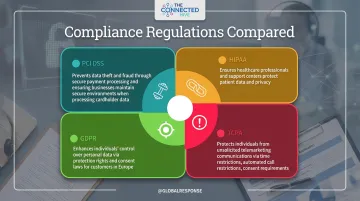
Compliance can't be retrofitted. It needs to be evaluated as a threshold requirement during vendor selection — before any other feature discussion.
IVR Best Practices for Call Centers
Design for the Caller, Not the System
The most common IVR design failure is organizing the menu around the company's internal structure rather than the caller's actual needs. If your three most common call types are claims status, billing questions, and provider lookup — those should be your first three options, in that order, regardless of which department "owns" them.
A few principles that consistently improve caller experience:
- Use plain language — say "check a payment" not "remittance inquiry"
- Lead with your top 3 call types, not your org chart
- Keep menu depth to 2 levels wherever possible
- Offer a live agent option without burying it
Integrate IVR Into Your Omnichannel Strategy
IVR shouldn't exist as a standalone channel. When connected to CRM, chat, and email systems, context from a voice call carries forward — so a customer who starts on IVR and transitions to chat doesn't have to re-authenticate or repeat their issue.
Modern CCaaS platforms can store IVR session data in a shared context repository, allowing that information to follow the customer across channels. The technology is available — the gap is usually in how it's configured and connected.
Review and Test Menus Regularly
IVR menus go stale. New products launch, departments reorganize, seasonal campaigns change routing priorities. An outdated IVR menu doesn't just confuse callers, it actively damages credibility.
Establish a review cadence — at minimum quarterly — that includes:
- Auditing menu options for accuracy
- Reviewing abandonment and no-match data by node
- Testing voice recognition error rates
- Confirming escalation paths still function correctly
The Future of IVR: AI and Omnichannel Integration
Conversational IVR Is Already Here
The shift from "press 1 for billing" to "how can I help you today?" is well underway. Genesys describes conversational IVR as NLP-based voice self-service that interprets the content and context of complete spoken requests — not just traversing a fixed menu hierarchy.
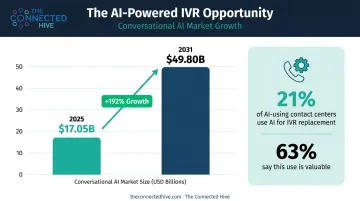
Among AI-using organizations surveyed in a 2023 US contact center study (via NICE), 21% used AI specifically for replacing IVR processes and intelligent routing, and 63% said that use would be valuable. Adoption is still uneven, but for businesses evaluating IVR today, the trajectory points toward AI-powered voice self-service as the default — not the exception.
The conversational AI market is projected to grow from $17.05 billion in 2025 to $49.80 billion by 2031. Not all of that applies to IVR specifically, but voice self-service is a primary driver — and investment is accelerating across the contact center space.
IVR as Part of a Broader Ecosystem
IVR is increasingly a component in a broader contact center architecture, not a standalone phone tree. A call that starts in IVR can hand off smoothly to other channels — with full context preserved throughout:
- Callback requests triggered when wait times exceed a threshold
- Chat or messaging sessions for customers who prefer text-based resolution
- Live agent interactions with the IVR transcript already in view
Businesses that treat IVR as an isolated system will fall behind customer expectations. Omnichannel continuity is becoming the baseline — the companies that build for it now will be better positioned when it becomes the norm.
Frequently Asked Questions
What is an IVR in a call center?
IVR (Interactive Voice Response) is an automated phone system used in call centers to route calls, offer self-service options, and connect callers with the right agent through voice commands or keypad inputs. It handles routine interactions without requiring a live operator for every call.
What is the difference between CRM and IVR?
A CRM stores and manages customer data and interaction history. IVR is a call-handling technology that automates phone routing and self-service. The two frequently work together, with IVR pulling CRM data to authenticate and personalize calls, but they serve completely different functions.
How does IVR improve customer experience?
A well-designed IVR reduces wait times, routes callers to the right agent on the first attempt, and provides 24/7 self-service for routine inquiries. A poorly configured IVR, however, creates the opposite effect — so design quality is everything.
What industries benefit most from IVR?
Healthcare, financial services, insurance, government agencies, and retail all rely heavily on IVR. High call volumes, the need for secure authentication, and regulatory compliance requirements make these sectors especially well-suited for IVR-based automation.
Is IVR still relevant with AI-powered chatbots and virtual agents?
IVR remains relevant, and it's actively evolving. Modern systems increasingly use NLP to enable natural conversation rather than rigid menu navigation. Rather than being replaced by chatbots, IVR is integrating with them as part of a unified omnichannel contact center strategy.
What should businesses look for when choosing an IVR system?
Start with compliance verification (HIPAA, PCI DSS) before evaluating anything else. From there, key criteria include:
- Compatibility with existing CRM and telephony infrastructure
- Scalability to handle volume spikes without degradation
- Analytics and reporting depth
- A clear, accessible path for callers to reach a live agent