CCaaS (Contact Center as a Service) exists specifically to close that gap. This guide explains exactly what CCaaS is, how it works under the hood, which features matter most, and how to evaluate solutions without getting lost in competing vendor claims.
Key Takeaways
- CCaaS is a cloud-hosted subscription platform that replaces on-premise contact center hardware entirely
- Modern CCaaS unifies voice, chat, email, SMS, and social media into a single agent interface with built-in AI and analytics
- The subscription model eliminates large upfront capital expenditures and lets businesses scale agent capacity on demand
- Platform selection should start with compliance requirements, integration dependencies, and growth goals — feature lists come second
What Is CCaaS?
Contact Center as a Service is a cloud-based software model where a third-party vendor hosts, maintains, and continuously updates all the infrastructure needed to manage customer interactions across every communication channel. Businesses subscribe and access the platform over the internet — no servers to buy, no hardware to maintain.
The "as a Service" model shifts operational responsibility entirely to the vendor. Uptime management, security patching, compliance certifications, and feature releases all become the vendor's problem. The business focuses on customer experience rather than technology maintenance.
How CCaaS Differs from Legacy Call Center Software
Traditional call center software was built around on-premises telephony — physical servers, PBX switches, and hard-wired voice infrastructure designed for one channel. It required dedicated IT staff to manage, was tied to a physical location, and upgrading it was a multi-month project.
CCaaS is architecturally different:
- Cloud-native — no on-site hardware required
- Channel-agnostic — voice, chat, email, SMS, and social managed in one platform
- API-first — pre-built connectors to CRMs, ticketing systems, and ERPs
- Continuously updated — the vendor ships new features on a rolling release schedule
How CCaaS Works
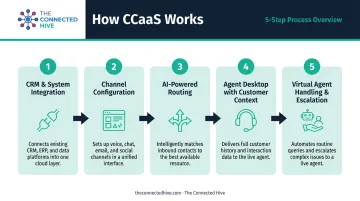
The end-to-end flow looks like this:
- The CCaaS platform connects to your CRM and back-office systems through pre-built APIs
- Communication channels are configured in the platform dashboard
- When a customer reaches out through any channel, AI-powered routing directs the interaction to the best available agent
- The agent desktop loads full customer context automatically, without manual lookup
- Virtual agents handle routine inquiries and escalate complex cases to live agents when needed
Cloud hosting also means agents can work from any location with an internet connection — a practical benefit for distributed or fully remote teams.
CCaaS vs. UCaaS
UCaaS (Unified Communications as a Service) handles internal business communication — video conferencing, messaging, and voice calls between employees. CCaaS is customer-facing, built to manage external interactions at scale.
They serve different functions and often run in parallel. Metrigy found that 29% of companies already use the same vendor for both CCaaS and UCaaS, with another 43% planning to consolidate. Most organizations run both, with each serving a distinct audience.
Key Features of a Modern CCaaS Platform
Omnichannel Routing and ACD
Automatic Contact Distribution (ACD) is the routing engine at the core of every CCaaS platform. It directs inbound interactions from any channel — voice, chat, email, SMS, social — to the right agent based on skills, availability, and customer priority.
The distinction between true omnichannel and multichannel matters here. Multichannel means multiple channels exist but operate in separate silos — agents switch between disconnected systems and customers repeat themselves. True omnichannel means a single unified queue and a single agent desktop across all channels. An interaction that starts on chat and escalates to phone carries full context with it — which directly reduces handle time and repeat contacts.
IVR and AI-Powered Self-Service
Modern IVR uses conversational AI to understand natural spoken language rather than routing callers through rigid touch-tone menus. Virtual agents handle routine inquiries — account balances, order status, appointment scheduling — around the clock, freeing human agents for complex, high-value interactions.
Self-service effectiveness is still a genuine challenge: a Gartner survey of 5,728 customers found that only 14% of customer service issues were fully resolved through self-service channels. Conversational AI improves containment rates, but human escalation paths remain essential.
Real-Time Agent Assist and AI Capabilities
AI doesn't just power self-service — it works alongside live agents in real time. During an active conversation, agent assist surfaces:
- Relevant knowledge base articles
- Suggested responses and next-best-action prompts
- Compliance reminders for regulated industries
- Customer sentiment signals and risk flags
This reduces handle time and improves resolution accuracy without requiring the agent to leave the interaction to search for information manually.
Workforce Engagement Management (WEM)
Mature CCaaS platforms include WEM natively — built into the platform rather than sourced from a third-party vendor — which means tighter data integration, unified reporting, and no additional licensing complexity.
WEM capabilities to evaluate include:
- AI-driven forecasting and scheduling
- Call recording and interaction analytics
- Quality monitoring and scoring
- Performance coaching and feedback workflows
- Schedule adherence tracking
Gartner treats WEM as a mandatory feature category in its CCaaS definition. If a vendor requires a separate bolt-on for core workforce tools, factor that cost into your total platform assessment from the start.
Analytics, Reporting, and CRM Integrations
CCaaS platforms provide both real-time dashboards and historical reporting on contact center KPIs: first-contact resolution, average handle time, CSAT, agent adherence, and more.
That reporting is only as useful as the data feeding it. CRM integration determines whether agents see full customer history before they say hello — or start every interaction blind. Leading platforms offer pre-built connectors to:
- Salesforce and Microsoft Dynamics 365
- Major ticketing systems (Zendesk, ServiceNow)
- ERP platforms for order and account data
Without these connections, even strong reporting leaves gaps that hurt both agent performance and customer experience.
CCaaS vs. Traditional Contact Centers
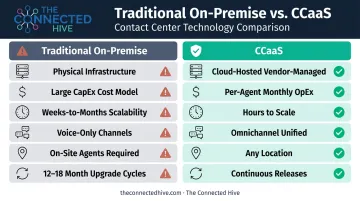
| Dimension | Traditional On-Premise | CCaaS |
|---|---|---|
| Infrastructure | Physical servers, PBX, switches; IT-dependent | Cloud-hosted; vendor-managed |
| Cost model | Large upfront CapEx + hardware maintenance | Per-agent monthly subscription (OpEx) |
| Scalability | Hardware procurement needed; weeks or months | Add seats and channels in hours |
| Channels | Predominantly voice-only | Voice, chat, email, SMS, social — unified |
| Agent location | On-site required | Any location with internet access |
| Upgrades | 12–18 month cycles; disruptive projects | Continuous vendor-managed releases |
A Forrester Total Economic Impact study commissioned by Cisco modeled a composite organization moving from legacy on-premise systems to a cloud contact center. The results: IT support staff dropped from 12 FTEs to 2 FTEs by year two, with $3.5M in avoided legacy license costs over three years. These are modeled estimates, but they reflect the scale of savings organizations typically realize when eliminating on-premise infrastructure.
Benefits of Adopting CCaaS
Cost Efficiency and Lower TCO
Eliminating on-premise hardware removes a significant cost layer: physical equipment, maintenance contracts, and the IT headcount required to manage it. Shifting to a per-agent subscription model converts contact center infrastructure from a capital expenditure to an operating expense that scales with actual usage.
The same Forrester TEI study referenced above modeled 304% ROI and $11.45M NPV over three years for the composite Webex Contact Center deployment. Forrester is clear these are modeled results from four customer interviews, not a market-wide average — but the framework illustrates why total cost of ownership shifts substantially when infrastructure maintenance moves to the vendor.
Scalability, Flexibility, and Business Continuity
CCaaS platforms scale on demand. Adding agent seats, enabling new channels, or expanding into new geographies can happen in hours rather than weeks. For organizations with seasonal volume spikes, this elasticity is the primary operational advantage. Common use cases include:
- Holiday retail surges requiring rapid seat expansion
- Insurance open enrollment periods with compressed timelines
- Government emergency response operations that activate on short notice
Business continuity is another measurable advantage. Major CCaaS vendors commit to 99.99% monthly uptime SLAs — Amazon Connect, NICE CXone, and Genesys Cloud all publish this commitment. Matching that reliability with in-house infrastructure requires significant redundant infrastructure investment that most organizations can't justify.
Continuous Innovation Without Upgrade Projects
CCaaS subscribers receive new features automatically as vendors ship them. Genesys Cloud, for example, publishes a rolling release schedule with new capabilities deployed across regions each week. There's no upgrade project to plan, no downtime window to schedule, and no budget cycle to wait for.
AI capabilities are evolving fast. Organizations on CCaaS platforms receive improvements as the vendor develops them, including:
- Agent assist tools that surface real-time guidance during live calls
- Virtual agents handling routine inquiries without human escalation
- Interaction analytics that surface trends across voice, chat, and email
Which Industries Benefit Most from CCaaS?
Healthcare and Financial Services
Healthcare and financial services share a common challenge: customer interactions are subject to strict regulatory requirements governing how data is captured, stored, and protected.
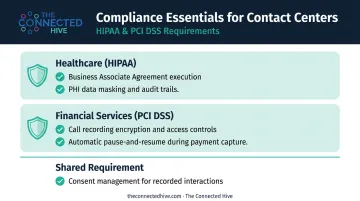
For healthcare, HIPAA requires any cloud provider handling electronic protected health information (ePHI) to execute a Business Associate Agreement and apply required safeguards. For financial services, PCI DSS governs how cardholder data is handled during phone-based payment interactions.
When evaluating CCaaS for these sectors, compliance must be a native platform capability — not an add-on. Relevant capabilities to verify include:
- Call recording encryption and access controls
- Automatic pause-and-resume during PCI-sensitive data capture
- PHI data masking and audit trail generation
- Consent management for recorded interactions
The Connected Hive's work with clients including Humana, Blue Cross/Blue Shield, Discover, and Ameriprise has been grounded in exactly this type of compliance verification — treating HIPAA and PCI-DSS as baseline requirements, not optional features.
Retail, E-Commerce, and Seasonal Demand Businesses
Scaling agent capacity up or down without hardware procurement is where CCaaS delivers its clearest ROI for retail and e-commerce. Holiday volume spikes, flash sales, and return surges can be addressed by spinning up additional seats in hours — not weeks.
Other sectors face the same demand-volatility problem:
- Insurance companies see call volume surge during open enrollment windows
- Government agencies handle emergency or disaster response spikes where under-capacity affects citizen outcomes, not just CSAT scores
- Seasonal retailers add temporary capacity without committing to year-round infrastructure costs
Government Agencies and SMBs
Government organizations benefit from CCaaS platforms with FedRAMP and GovRAMP certifications, data residency options, and multi-channel citizen engagement capabilities. The FedRAMP Marketplace lists cloud contact center offerings with authorization status that agencies can verify at the product level — a critical evaluation step for any public sector deployment.
Small and mid-sized businesses gain something different: access to enterprise-grade capabilities without enterprise-scale infrastructure investment. The subscription model means a 20-seat SMB operation accesses the same AI routing, omnichannel desktop, and analytics tools as a 2,000-seat enterprise — without buying a single server or signing a multi-year hardware lease.
How to Choose the Right CCaaS Solution
Start with a Needs Assessment
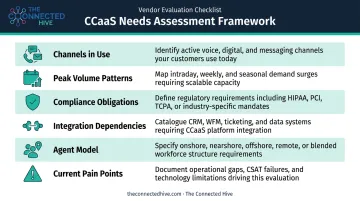
Before looking at a single vendor, document your current state:
- Channels in use today — voice, chat, email, SMS, social — and which you plan to add
- Peak volume patterns — hourly, seasonal, or event-driven spikes
- Compliance obligations — HIPAA, PCI-DSS, GDPR, FedRAMP, or state-specific requirements
- Integration dependencies — CRM, ERP, ticketing systems, and their current versions
- Agent model — on-site, remote, or hybrid; single location or distributed
- Current pain points — what specifically isn't working with your existing infrastructure
Without this baseline, vendor comparisons default to marketing claims rather than fit.
Evaluation Criteria That Actually Differentiate Platforms
When comparing platforms, go beyond the feature checklist:
- True omnichannel vs. multichannel — single unified queue or siloed systems with a shared login?
- AI capabilities: native or bolt-on — is the AI built into the platform, or third-party licensed with a markup?
- WEM depth — is workforce management native, or does it require a separate vendor and contract?
- Security certifications — SOC 2 Type II, FedRAMP, HITRUST, PCI-DSS, HIPAA BAA availability
- Uptime SLA terms — what are the exclusions? What triggers service credits?
- Total cost of ownership — per-seat pricing, add-on licensing, implementation, and professional services combined
- Independent analyst position — the Gartner Magic Quadrant for CCaaS (September 2025) and the Forrester Wave: Contact-Center-As-A-Service Platforms, Q2 2025 are the two most referenced third-party assessments for vendor stability and platform maturity
Where Advisory Support Adds Value
Even with a solid evaluation framework, the CCaaS vendor landscape is dense — dozens of platforms with overlapping marketing claims and real differences in actual capability. Without experienced guidance, the most common evaluation mistakes include:
- Conflating multichannel with true omnichannel architecture
- Underestimating integration complexity until contracts are signed
- Missing add-on licensing costs that significantly inflate the total cost
The Connected Hive's consultants have spent 20+ years evaluating CCaaS platforms across healthcare, financial services, government, and retail. That experience translates into faster vendor shortlisting, sharper contract negotiations, and fewer costly surprises post-implementation — at no cost to clients.
Frequently Asked Questions
What does contact center as a service mean?
CCaaS means a cloud-hosted subscription model where the vendor manages all contact center infrastructure and software. Businesses access the platform over the internet to handle customer interactions across voice, chat, email, SMS, and social — without owning or maintaining any on-premise hardware.
How is contact center as a service different from a traditional contact center?
Traditional contact centers require capital investment in physical servers, telephony switches, and on-site hardware, typically supporting voice only. CCaaS is cloud-hosted, omnichannel, and subscription-based, scaling on demand with no hardware procurement or dedicated IT infrastructure to manage.
What is the difference between a CRM and a contact center?
A CRM is a system of record: it stores customer data, interaction history, and profiles. A CCaaS platform handles real-time customer interactions across channels — that's the system of engagement. The two work best when integrated, with CRM data surfacing automatically in the agent desktop during live interactions.
What is the difference between a contact center and customer experience (CX)?
A contact center is the operational technology and team infrastructure used to handle customer interactions. Customer experience (CX) is the broader perception a customer forms across every touchpoint with a brand — the contact center is one critical component of that strategy, not the whole of it.
Is CCaaS suitable for small and mid-sized businesses?
CCaaS is well-suited for SMBs because the subscription model eliminates large upfront hardware costs, agent seats can be added as needed, and businesses access enterprise-grade capabilities — AI routing, omnichannel, analytics — at a scale and price point that matches their size.
How long does it take to implement a CCaaS solution?
Timelines vary by complexity. Straightforward deployments go live in 2–4 weeks, while enterprise rollouts with multiple integrations typically take 3–6 months. By comparison, equivalent on-premise projects often run 12–18 months.